
Fewer cancelled lessons. Faster rebookings.
The weather runs your calendar. SurfSignal puts your spots and your lesson conditions on your students' phones, so they see the next good window and come back to you to rebook, before you have to chase them.


Free for schools, shops and clubs. No account needed, for you or for them.
The weather cancels. Then the work starts.
The call you have to make
Wind drops, the swell dies, the lesson is off. You make the call and a full afternoon empties out.
The rebooking chase
Now you go looking for a new date, without knowing which day will actually work. You send the messages. Half of them never come back.
The quiet drop-off
A student who missed a session and never rebooked usually stops coming altogether. The gap does the damage, not the cancellation.
You stop chasing dates. They start asking for them.
They see the next good day before you email them
Every student who installs your spots gets your conditions with them. Once they switch notifications on and pick a time of day, SurfSignal checks those conditions every day and sends at most one notification: today, tomorrow and the next day that matches, on one line. A washed-out Tuesday turns into a green Saturday on their phone before you have sent a single message, and they come back to you to book it.
Free for them too. The free tier covers two spots, a seven day window, the full alert engine, live wind and live cams, with no account and no card.
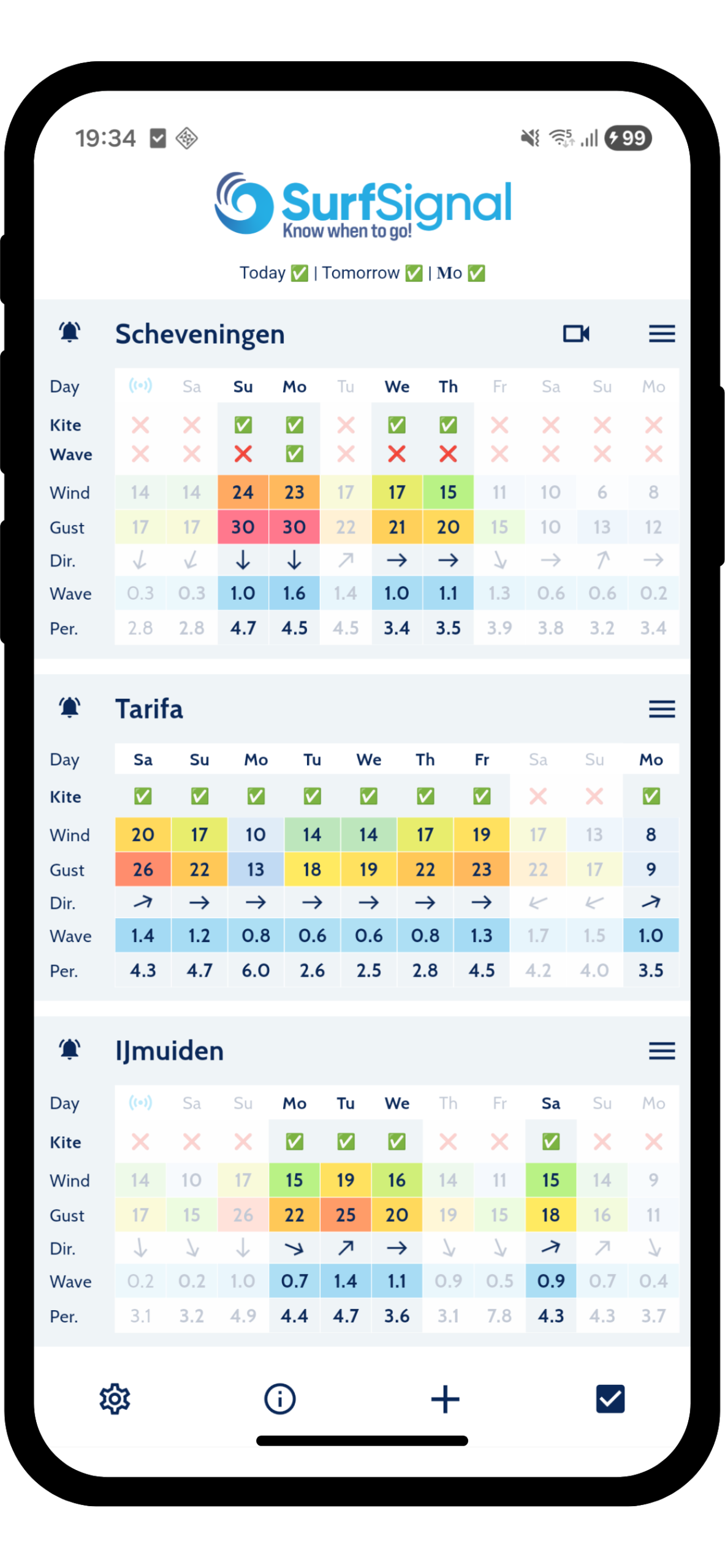
Nobody reads that water like you do
You have watched your spot in every wind direction, at every tide, for years. You know which cross-shore is fine for a beginner group and which one sends them downwind, and which swell looks perfect from the boulevard and closes out on the sandbank. That judgement is what students are actually paying for, and right now it lives in your head and leaves one message at a time.
SurfSignal is where you write it down once. A spot is your pin, on the exact patch of water you teach on. A condition set is your call on it: wind range, direction, gusts, waves, swell, tide, the hours that count and how many good hours in a row a lesson needs. Put one set on for the beginner group and another for your advanced group, and they are judged separately on the same spot.
No beginner or intermediate presets. The app does not have any, because a beginner day at your spot is not a beginner day two beaches along. You set the numbers.
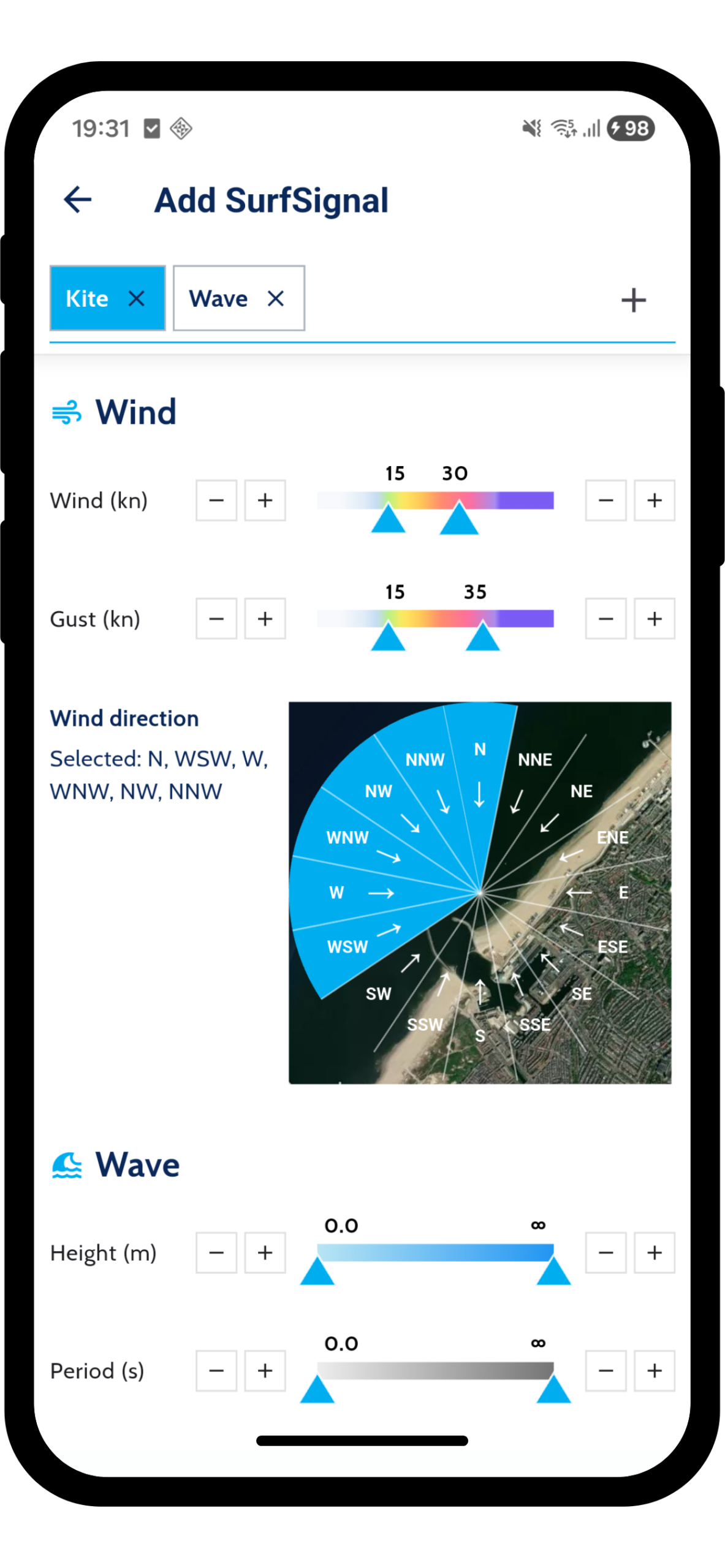
Your students do not get a forecast. They get your verdict on it, every day.
Set it up once, in the app
Become a partner
Download SurfSignal, open Settings and sign up. Free, and every partner feature is unlocked straight away.
Set the window you know works
Drop a pin on the water you teach on and write your call into a condition set: wind range, direction, gusts, waves, tide. Add a separate set for beginners and for your advanced group.
Share it, or nothing happens
This is the step that decides it. Your spots only reach people you put them in front of, so drop your link in every booking and cancellation email, hang the QR poster, and tell your instructors to share it on the beach.
The numbers behind your call
You are not going to put your name on a forecast you do not trust, and neither are we. Wind, gusts and direction come from the highest resolution model that covers your coast, not from one global model stretched over the whole planet.
The highest resolution model available at your pin is selected per spot, automatically, and where a regional model runs out the global ones take over. Waves, swell, water temperature and tide come from the marine side, blended from NOAA, Météo-France, the Met Office, ECMWF and DWD. Which model you end up with is our call, not a setting you have to learn: knowing which one holds up in which region and at which range is a job in itself.
Resolution that lands on the beach
Those regional models run on a 1 to 2.5 km grid, and we resolve your pin to a 250 metre cell so it stays inside it. You get the forecast for the water you teach on, not for the town behind it. Hourly, up to ten days out.
Fresh, not this morning's run
New model data is picked up as often as every 15 minutes. When a run turns Saturday around, the app has it long before the group chat does.
Measured, not only modelled
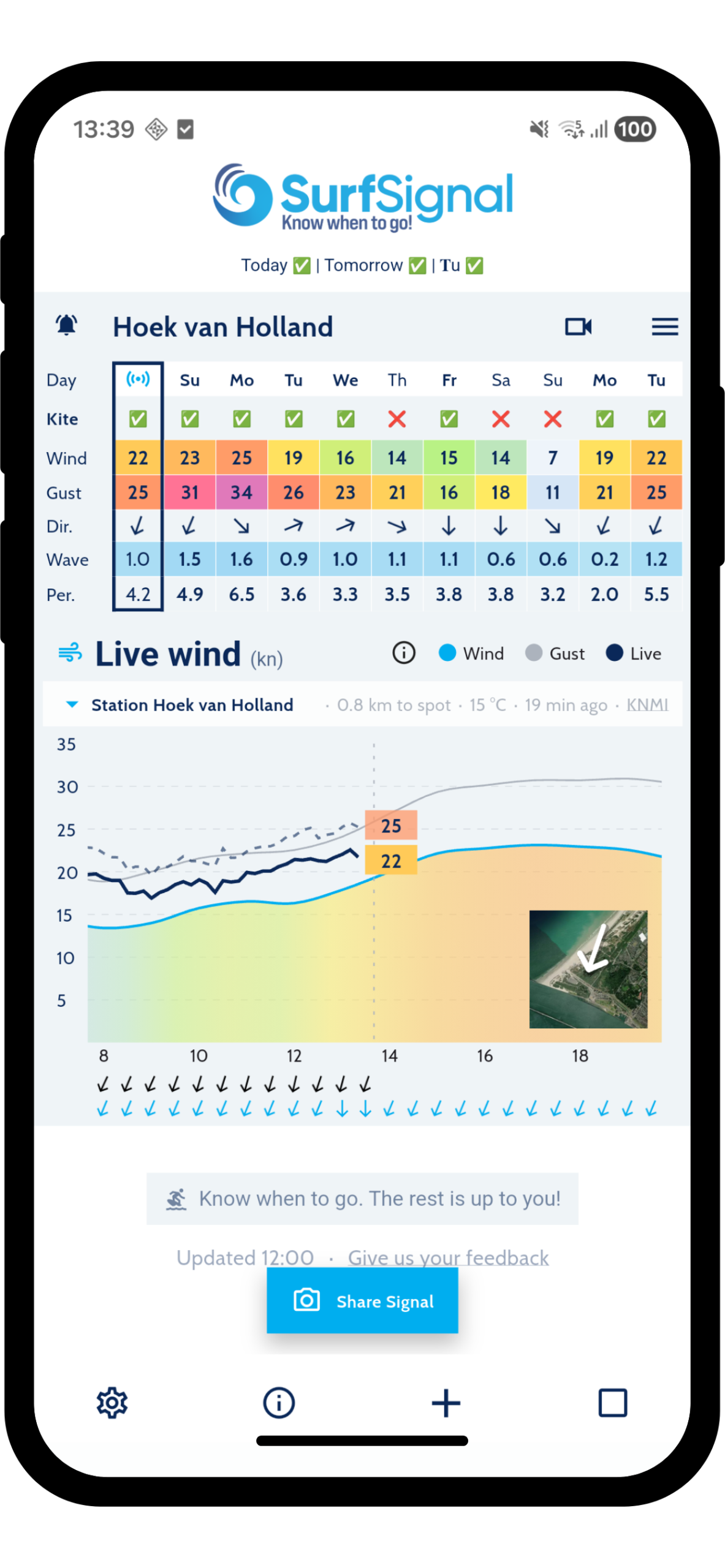
Live wind from 27 national weather networks, among them KNMI, DWD, Météo-France, the Met Office, MET Norway and AEMET, with airport observations filling in almost everywhere else. The station's distance to your pin and the age of the reading are always on screen.
You are the one whose name is on the call. Making sure the numbers behind it hold up is our half of the job.
Make the morning call on measured wind
At 08:00 a forecast is still a prediction and a station is a fact. Live wind, gusts and direction sit right next to the forecast, with cams where the spot has one. When you decide whether the group goes out, you and your students are reading the same numbers.
Already on Viking Bookings?
SurfSignal is integrated with Viking Bookings. Paste your SurfSignal partner id into your booking environment once, and your spots and conditions load in automatically. The forecast then sits right where your students book, so the good window and the booking button are on the same screen. Nothing to build, nothing to maintain.
Viking BookingsGetting it into their hands
The one that works best
Put the link in your booking and cancellation emails
Your confirmations and cancellations already land in their inbox at the exact moment the weather is on their mind. One line with your partner page link turns a cancellation into the reason they come back: not "sorry, it is off", but "here is when the next window is, and you will know before I do".
See a live partner pageInstructors share it on the beach
Every spot in the app has a share button that hands over a link or a QR code. An instructor standing on the sand can put the school's spot on a student's phone in the time it takes to rig up.
Your Instagram, amplified
You already post when wind is coming. Tag SurfSignal in it and we share it on to our own audience, so your window reaches riders who have never heard of you.
A QR poster for the wall
Your partner page prints a poster with your own QR code and short instructions. Hang it in the changing room, the canteen or the bus. Students scan it once and are set up before their next lesson.
How to print itAnywhere you already post
The same link works in your newsletter, your link in bio, the class WhatsApp group or a pinned message in your community. One tap and your spots are installed, with your conditions already set.
The people who build the sport ride free
Schools and clubs are why anyone starts. The partner programme is free.





















Schools tell us students rebook sooner. Trusted by schools, clubs and shops across Europe. Questions? Mail info@surf-signal.com or start with the Partner Kit.
Ready?
Get the app, set up your spots and find out for yourself!